
THE PROBLEM · PLUMBING, HVAC AND FIELD SERVICE
Service calls come in all day, and scheduling them eats the day.
Veda builds you a dispatcher: customers report the problem on one link, each job is sized before it is booked, and one press fills the week with an arrival window for every visit.
01 · THE PROBLEM
INTUIST · VEDA
01
THE PROBLEM
Where the time goes.
Calls, texts and emails arrive all day, and each one is copied into a calendar by hand.
A technician drives out and finds the job needs a part, or a second trade, that nobody asked about.
An emergency waits behind routine visits, because every request looks the same until someone reads it.
The schedule shows what is booked, not the hours your crew still has.
02 · THE FIX
INTUIST · VEDA
02
THE FIX
What Veda builds for it.
You write your crew and your dispatch rules once, in plain English.
Customers report a problem on your own link, and the calls that come by phone are logged on the same board.
Press Size the job: the AI names the trade, the priority and the rule it matched, the realistic minutes on site, the likely parts and the technician whose skills and area fit. Anything still missing becomes a question for the customer, not a guess.
Press Auto-schedule: every sized call is placed against the crew's skills and each day's remaining capacity, emergencies first, with the reason each visit landed where it did.
WHAT IT WILL NOT DO
It only schedules a job it has sized, and the customer message it drafts carries no invented date or price.
03 · SEE IT WORK
INTUIST · VEDA
03
SEE IT WORK
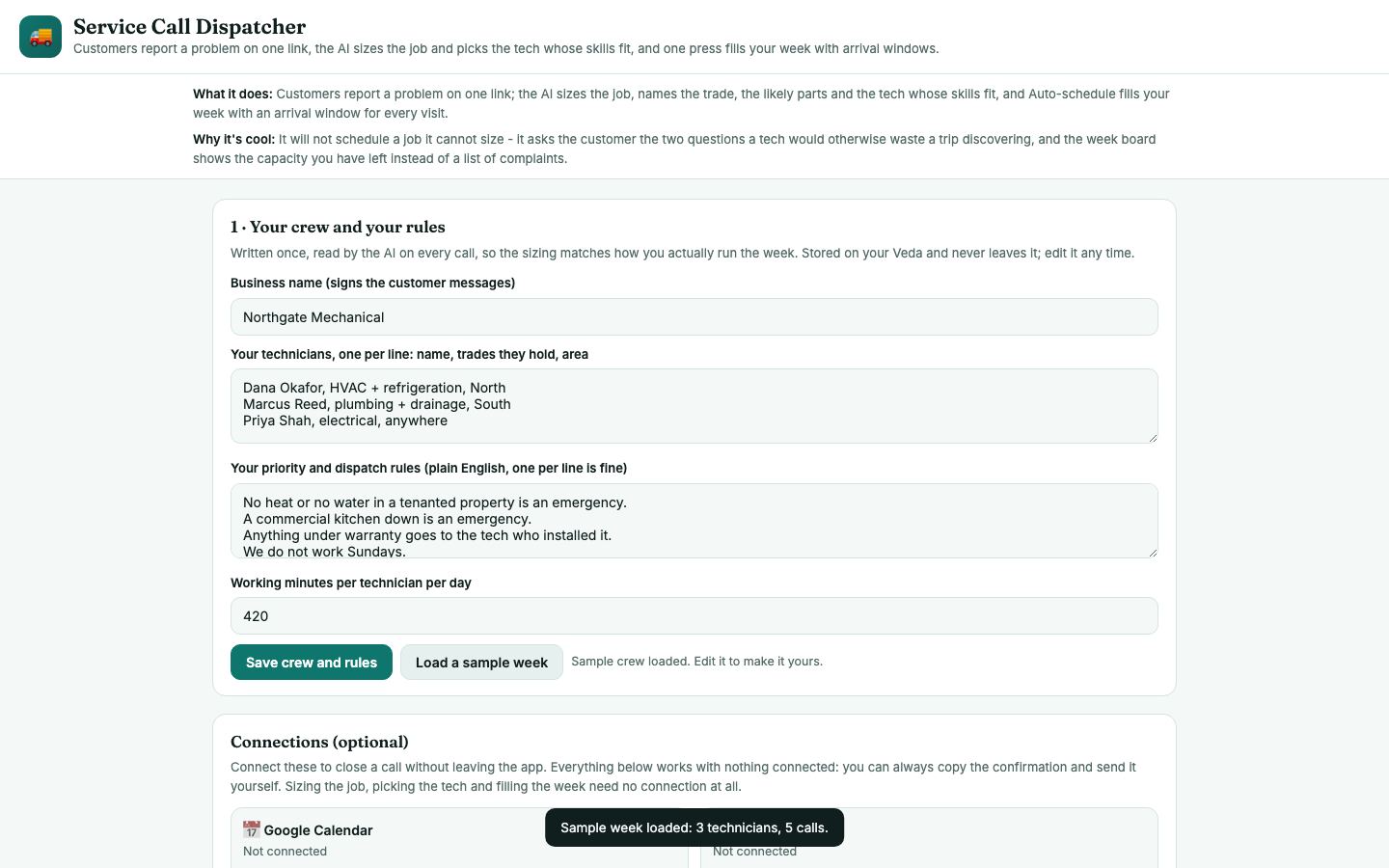
Service Call Dispatcher, working.
TRY IT
Press Load a sample week: a sample crew and a week of calls appear.
Press Size the job on a call and read the trade, the priority, the minutes and the parts it names.
Press Auto-schedule and read why each visit landed where it did.
04 · MAKE IT YOURS
INTUIST · VEDA
04
MAKE IT YOURS
Yours will not match the sample. Tell her how you work.
THE BRIEF · PUT IT IN HER BOX AND CHANGE ANY WORD
“Build me a service call dispatcher. Customers report a problem on one link, each job is sized by trade, priority, time on site and likely parts, and one press schedules my crew's week with an arrival window for every visit.”
It opens the home page with these words in Veda’s box. Nothing is sent until you press Send, and your work email is the only sign-up: no password, no card.
- Who it is for
- Plumbing, HVAC and field service
- Works with
- Google Calendar and Gmail, each optional
- Once it is live
- Veda hosts it, watches it day and night and repairs what breaks
- When you want a change
- Write to her, at any hour. She makes the change and shows you
- Price
- $50 a month on Veda Lite14 days free, no card; then 3 changes and $10 of AI a month; the apps pause, then are deleted, if you do not keep the plan; more apps on Plus and Team at app.intuist.ai/lite/pricing
SERVICE CALL DISPATCHER · AT A GLANCE
05 · QUESTIONS
INTUIST · VEDA
05
QUESTIONS
What people ask first.
- How do I schedule service calls without retyping every request?
- Give customers one link to report the problem, so every request arrives in the same shape. The Service Call Dispatcher puts each one on a board, sizes it by trade, priority, minutes on site and likely parts, and books the week in one press.
- Will it book a job it does not understand?
- No. It schedules only a job it has sized, and anything still missing is turned into direct questions for the customer.
- What does it connect to?
- It works with Google Calendar and Gmail. Each one is optional, it asks your permission before it connects, and the whole app works with nothing connected.
- What does it cost?
- $50 a month on Veda Lite. The first 14 days are free, no card; then 3 changes and $10 of AI a month; the apps pause, then are deleted, if you do not keep the plan; more apps on Plus and Team at app.intuist.ai/lite/pricing.
- Can it be changed to fit how we work?
- Yes. Tell Veda in plain English what to change or add, by email, at any hour, and she makes the change. You never edit code.
06 · OTHER PROBLEMS
INTUIST · VEDA
06
OTHER PROBLEMS
Other problems she already has an answer for.
- Work orders arrive as emails, PDFs and photos, and someone retypes every one.
Facilities and building maintenance
- A client asks for a quick tweak, and you do it for free.
Agencies, studios and contractors
- Prior authorizations come back denied for something that was missing.
Medical practices and clinics
- Students slip into chronic absence before anyone writes home.
Schools and nonprofits
- People ask for a price while you are on a job, and half the details are missing.
Trades and small service businesses
- Website enquiries pile up, and nobody knows which ones are worth a call.
B2B sales teams
Yours is not here? Start with the problem · Every app template