
What Happens When Nobody Has to Read the Email?
A framework for finding real AI opportunities: look for where a process stops because someone has to read, understand, and decide before work can continue.

Every business we talk to thinks its workflow problems are unique. Usually, the details are, but the underlying problems are not.
At a recent Intuist Growth Spotlight, we looked at a facilities maintenance company processing hundreds of retail work orders across 49 states. Its technology stack wasn't unusual: email, PDFs, photos, text messages, voicemail, and spreadsheets. The real friction was in the gaps between those systems.
A work order would arrive by email, often with a PDF or photo attached. Someone had to open it, read it, figure out what it said, and enter the information into a spreadsheet. From there, someone searched for an appropriate local subcontractor and called to see if they were available. Once a contractor was matched and dispatched, updates came back by text or email, which meant someone had to read those messages and update the spreadsheet again. Billing information came back through another message and had to be entered, too.
None of these tasks was particularly complicated. That was almost the point. Hundreds of work orders meant hundreds of emails, documents, messages, and pieces of information that had to be manually read, interpreted, transferred, and checked just to keep the work moving.
The Interesting Part Isn't the Automation
For this company, we built an AI-powered work order workflow on Intuist’s Veda platform. Instead of a person opening and reading every incoming email, PDF, or photo, AI reads the request, understands what it contains, extracts the relevant information, and turns it into a structured work order.
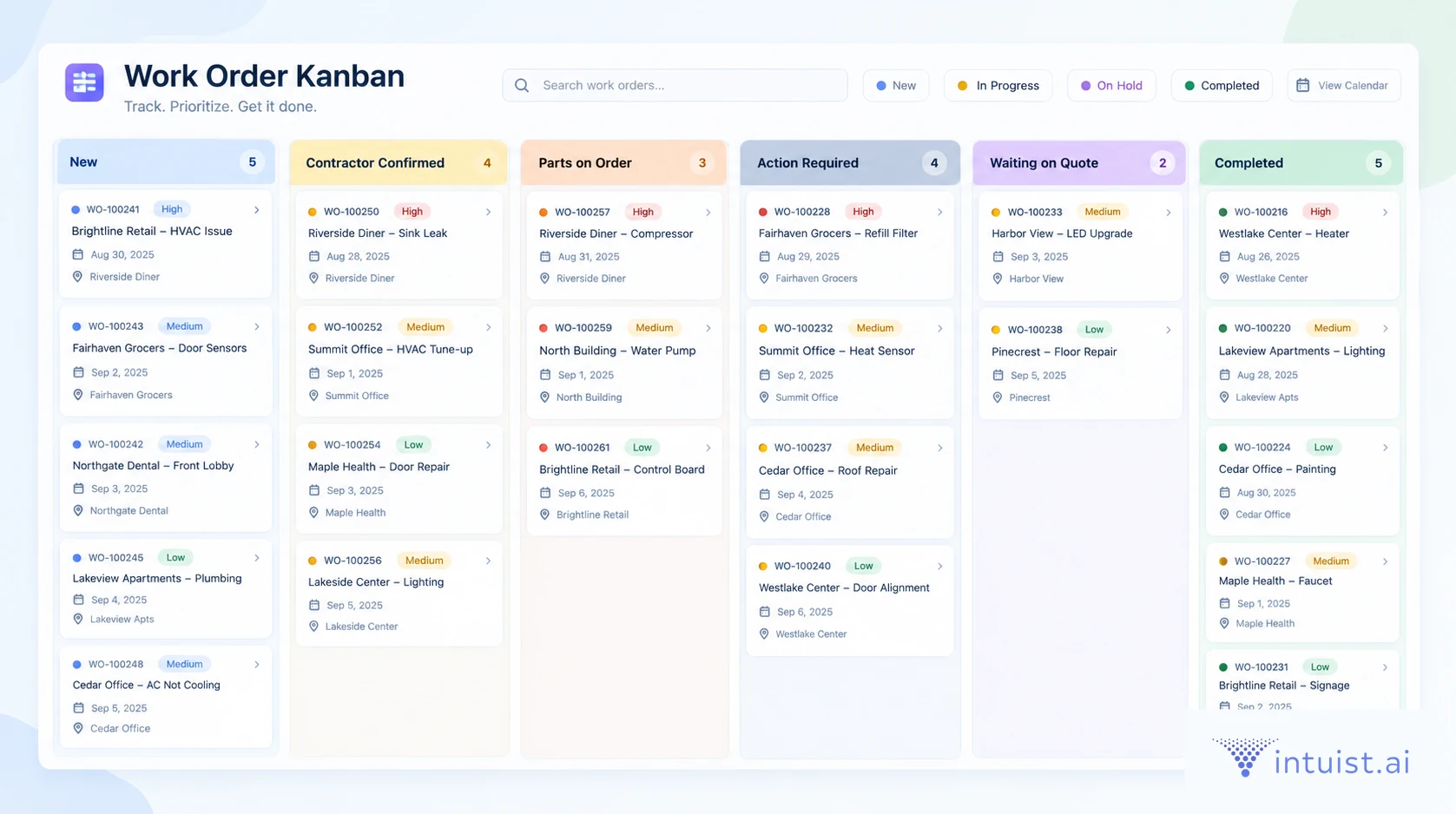
From there, automation can take over: creating and updating records, moving work through the process, matching and dispatching the appropriate contractor, and triggering the next steps. When another piece of unstructured information comes back – a text, email, invoice, or document – AI can interpret it, and the workflow can continue.
The distinction between AI and automation is important. We've been able to automate actions for a long time: move a record, update a field, send a notification, or trigger another system. The harder problem was what happened immediately before the action, when somebody had to read something, understand what it meant, and decide what should happen next.
That's where many automated processes stopped. AI can now help bridge that gap.
People are still managing customers, making judgment calls, and handling exceptions. What they don't have to do is read hundreds of emails simply to keep hundreds of work orders moving.
Look for Where the Process Stops
This gives us a useful way to think about where AI can create meaningful value. Instead of starting with, “What tasks could we automate?” try asking, “Where does this process stop because someone has to understand something?”
Look for shared inboxes, documents someone has to interpret, requests someone has to classify, information someone has to extract, or tickets someone has to route. Look for processes that depend on one particular employee knowing what happens next. If the workflow slows down because that person is out of the office, you may have found something more interesting than a staffing problem.
Listen for names, too. If someone explains a process by saying, “Sarah gets the email, then Mike figures out where it goes, then Jen updates the spreadsheet,” keep asking questions. There is probably a reason the process depends on Sarah, Mike, and Jen, and understanding that reason is much more useful than starting with a list of AI features.
Manual Work Creates More Manual Work
There was another part of this workflow that was particularly interesting. Some of the financial information was being manually transferred between systems, which meant leadership was also reviewing it to make sure it had been entered correctly.
In other words, manual work created more manual work. The business wasn't just paying for the time it took someone to transfer the information; it was also paying for someone else to verify it.
That's easy to miss when building an ROI case. We tend to ask, “How long does this task take?” and multiply that by the number of times someone does it. But that doesn't capture the full cost of a manual process.
A better question is, “What else happens because this task is manual?” Does work sit in a queue waiting for someone to get to it? Does someone else have to check it? Do errors create rework? Does the entire customer request take longer to complete? What higher-value work isn't getting done because people are spending their time keeping the process moving?
Sometimes the business case isn't five minutes of data entry. It's everything that accumulates around those five minutes.
Don't Look for AI Use Cases
This isn't really a facilities management story. Change the nouns and you'll find versions of the same pattern in property management, accounting firms, law firms, healthcare organizations, professional services firms, and probably inside your own company.
Something comes in. Someone reads it, understands it, and decides what happens next. Then the process continues.
For years, businesses have been able to automate many of the steps that happen after that decision. What's different now is that AI can increasingly help with the reading, interpretation, extraction, and classification that happen before it.
That's why I wouldn't start a customer conversation by asking, “Do you have an AI use case?” I'd ask, “Walk me through what happens when a new request comes in.”
Then listen for where someone opens something, reads something, copies information from one place to another, makes the same kind of decision over and over, waits for someone else, or checks someone else's work. Those human-dependent gaps are often where some of the most useful AI opportunities are hiding.
Your customers don't have to know what their AI use cases are. They know how their businesses work, where things get stuck, what takes too long, and what their people spend too much time doing.
Start there. Find one meaningful problem, understand the work around it, solve it, and prove the value. Then look for where the same pattern appears next.
In Intuist Growth Spotlight sessions, we analyze real business workflows to show how AI and automation transform operations, helping partners spot similar opportunities in their own customer base.
WRITTEN BY

Catherine McGowin
VP, Partner Growth
20+ years of experience shaping products, services, and new business models across technology and emerging markets. She has worked across product, customer, and go-to-market teams to translate market needs into practical solutions, scalable offerings, and growth.
LINKEDINKEEP READING
ALL POSTSFrom MSP to AISP: The Agentic AI Evolution for Managed Service Providers
The landscape of IT services is rapidly transforming. The evolution from MSP to AISP is a strategic imperative for growth and relevance.
4 min read
From Pilot to Production: The SMB's Agentic AI Success Blueprint
Why most SMB agentic AI pilots stall before production, where agents already pay off, and how no-code platforms let managers build their own agents.
3 min read
Why AI Adoption Feels So Hard (And How We Fix It)
AI’s power is huge, but complexity blocks adoption. Discover why SMEs struggle and how an invisible tech layer can make AI simple, practical, and scalable.
4 min read
MEET VEDA
Now ask her to build you one.
Veda builds your AI apps and agents, runs them, and fixes them before you notice. Say what should exist and she replies with a link.